

Analytics
What Dominevo keeps about a camera — event snapshots and media, package delivery, audio events and markers, face matching — with defaults and ranges.
The Analytics tab holds what happens to a detection after the pipeline
emits it: the pictures kept with it, the sounds that become events, packages,
faces. Reach it with Devices → camera → Analytics (?tab=analytics).
The detection knobs themselves — tracking, parked objects — are on
Detection pipeline, and the
retention window is on Recording.
This tab shows only camera-scoped settings. The cluster-wide ones (battery and offline alerts, the retention windows for notification history, timelapses, the artefact shelf and digest mosaics, and the semantic-search index actions) are on the Pipeline Analytics addon's own settings (Addons → Pipeline Analytics). See Cluster-wide analytics settings.
A field you have not changed on this camera shows the cluster-wide value, marked "Shown value is the cluster-wide setting". Saving a field writes only that field to the camera; the others keep following the cluster.
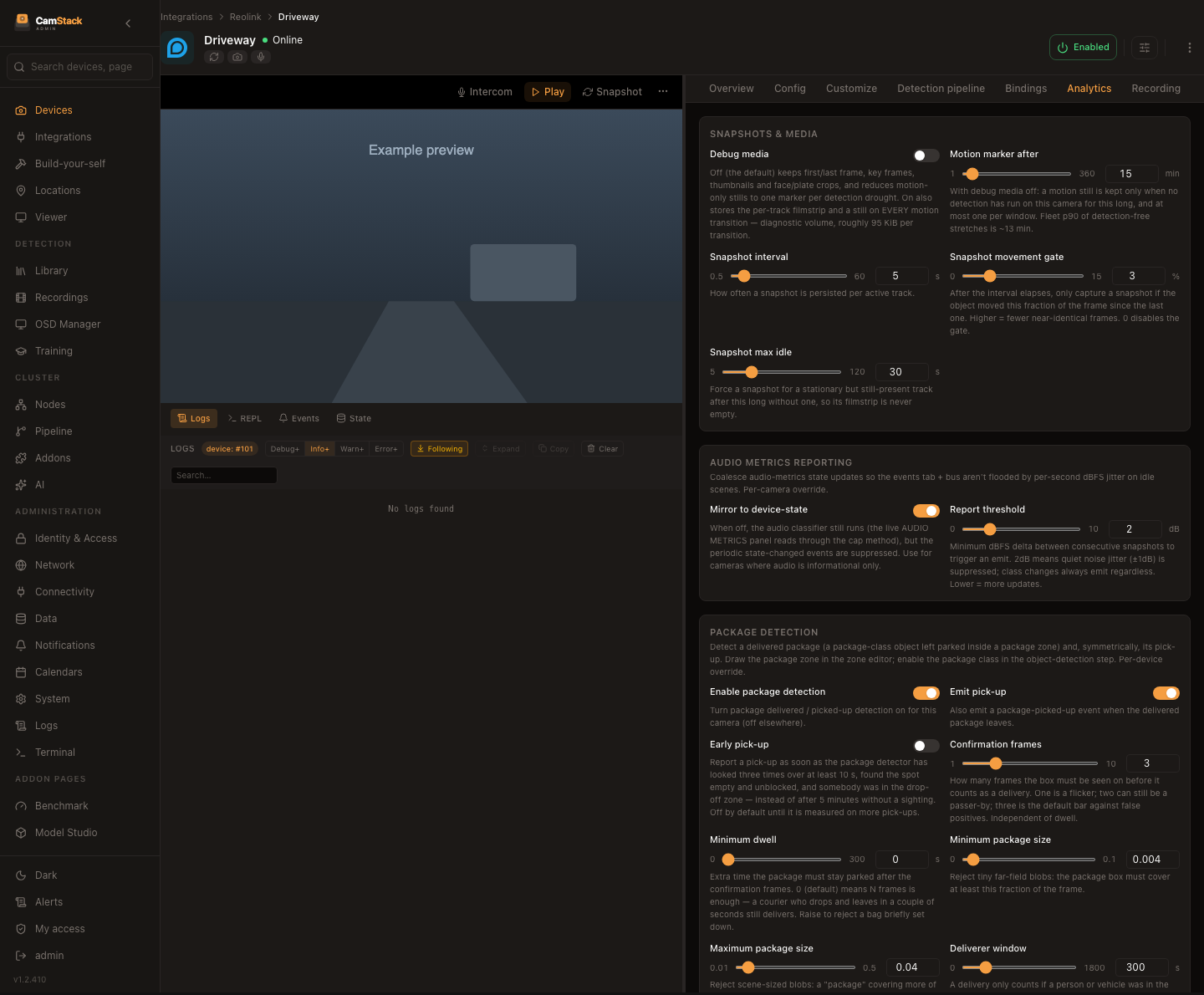
Snapshots & media
What is stored with a track.
| Setting | Default (schema default) | Range | Meaning |
|---|---|---|---|
| Debug media | off | Off keeps the first and last frame, key frames, thumbnails and face/plate crops, and reduces motion-only stills to one marker per detection drought. On also stores the per-track filmstrip and a still on every motion transition — about 95 KiB per transition. Diagnostic volume. | |
| Motion marker after | 15 min | 1–360 min | With debug media off: a motion still is kept only when no detection has run on this camera for this long, and at most one per window. |
| Snapshot interval | 5 s | 0.5–60 s | How often a snapshot is saved for each active track. |
| Snapshot movement gate | 3 % | 0–15 % | After the interval, capture only if the object moved this fraction of the frame since the last one. Higher means fewer near-identical frames. 0 disables the gate. |
| Snapshot max idle | 30 s | 5–120 s | Force a snapshot for a stationary but still-present track after this long, so its filmstrip is never empty. |
This is separate from Config → Snapshot, which is how Dominevo takes a still of the camera for thumbnails and the preview.
Audio metrics reporting
| Setting | Default (schema default) | Range | Meaning |
|---|---|---|---|
| Mirror to device-state | on | Off, the audio classifier still runs and the live audio panel still works, but the periodic state-changed events are suppressed. Use for a camera where audio is informational only. | |
| Report threshold | 2 dB | 0–10 | Smallest level change between snapshots that triggers an update. Class changes always report. |
Package detection
Delivered and picked-up detection for a porch camera. It uses the package zone you draw in Zones.
| Setting | Default (schema default) | Range | Meaning |
|---|---|---|---|
| Enable package detection | on | Turn delivered / picked-up detection on for this camera. | |
| Emit pick-up | on | Also emit an event when the package leaves. | |
| Early pick-up | off | Report a pick-up as soon as the detector has looked three times over at least 10 s, found the spot empty and unblocked, and somebody was in the drop-off zone — instead of after 5 minutes without a sighting. | |
| Confirmation frames | 3 | 1–10 | Frames the box must be seen on before it counts as a delivery. One is a flicker; two can still be a passer-by. |
| Minimum dwell | 0 s | 0–300 | Extra time the package must stay after the confirmation frames. 0 means a courier who drops and leaves in seconds still delivers. Raise it to reject a bag briefly set down. |
| Minimum package size | 0.004 | 0–0.1 | The box must cover at least this fraction of the frame; rejects far-field blobs. |
| Maximum package size | 0.04 | 0.01–0.5 | A box covering more of the frame than this is scenery (a light patch, a doormat). Real parcels measure about 1–2 % of the frame. This, not confidence, is the lever against a static false positive. |
| Deliverer window | 300 s | 0–1800 | A delivery counts only if a person or vehicle was in the package drop-off zone within this many seconds before the package appeared, and a pick-up only with somebody there when it vanished. 0 disables the requirement. |
The package step is off by default and runs where the camera has package zones; see Detection.
Audio detection
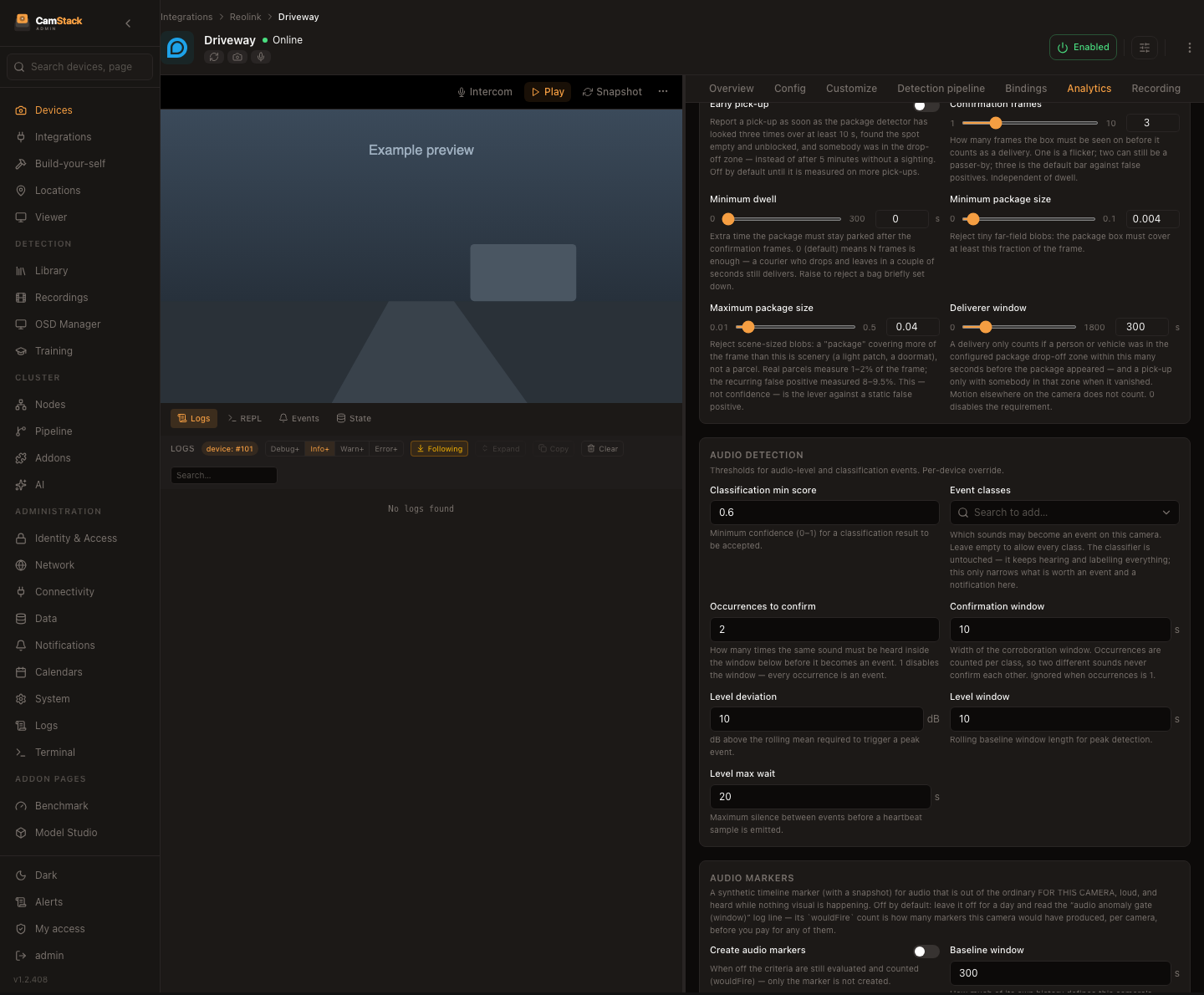
What turns a classified sound into an event on this camera. The classifier keeps hearing everything; these settings narrow what is worth an event.
| Setting | Default (schema default) | Range | Meaning |
|---|---|---|---|
| Classification min score | 0.6 | 0–1 | Minimum confidence for a classification to be accepted. |
| Event classes | all | any of the sound classes | Which sounds may become an event here. Empty allows every class. |
| Occurrences to confirm | 2 | 1 and up | Times the same sound must be heard inside the window before it is an event. 1 disables the window. |
| Confirmation window | 10 s | 1 and up | Width of the corroboration window. Counted per class; two different sounds never confirm each other. |
| Level deviation | 10 dB | 1 and up | How far above the rolling mean a level must be to trigger a peak event. |
| Level window | 10 s | 1 and up | Length of the rolling baseline for peak detection. |
| Level max wait | 20 s | 1 and up | Longest silence between events before a heartbeat sample is emitted. |
Audio markers
A timeline marker for a sound that is out of the ordinary for this camera while nothing is happening visually. Off by default: leave it off for a day and read the log's would-fire count to see how many markers the camera would have produced.
| Setting | Default (schema default) | Range | Meaning |
|---|---|---|---|
| Create audio markers | off | Off still evaluates the criteria and counts them; only the marker is not made. | |
| Baseline window | 300 s | 30 and up (30) | How much of its own history defines the camera's "normal" loudness; also the warm-up before the first marker. |
| Minimum volume | −25 dBFS | −60–0 | Absolute loudness floor. A quieter sound is never a marker, however unusual. |
| Out-of-the-ordinary factor | 4 | 1 and up (0.5) | Multiples of the camera's own loudness jitter the sound must exceed. A busy road needs a bigger jump than a garden. |
| Minimum jump | 12 dB | 1 and up | Floor on how far above normal the sound must sit. |
| Motion-quiet window | 20 s | 0 and up (5) | Suppress the marker if a track was alive or motion was reported within this long. |
| Minimum gap | 120 s | 5 and up (5) | Shortest interval between two markers. |
| Ceiling per hour | 3 | 1 and up | Hard burst ceiling. Drops past it are counted. |
| Ceiling per day | 12 | 1 and up | Hard daily ceiling — the worst a mis-tuned threshold can cost. |
Audio episodes
Groups one long sound into one timeline episode instead of a stream of events.
| Setting | Default (schema default) | Range | Meaning |
|---|---|---|---|
| Create audio episodes | on | Off switches off the grouping only: audio still creates events and notifies, but a long sound becomes one event per class change, then one every 5 s while it lasts. | |
| Open hold | 1.5 s | 0 and up (0.5) | The class must be heard this long before an episode opens; filters brief blips. |
| Close gap | 12 s | 1 and up | The class must be absent this long before the episode closes. |
| Cooldown | 60 s | 0 and up (5) | After an episode closes, the same class cannot reopen until this passes. |
To make a camera hear less altogether, use the Audio classification mode or the Audio detection & classification switch in the header.
Face recognition
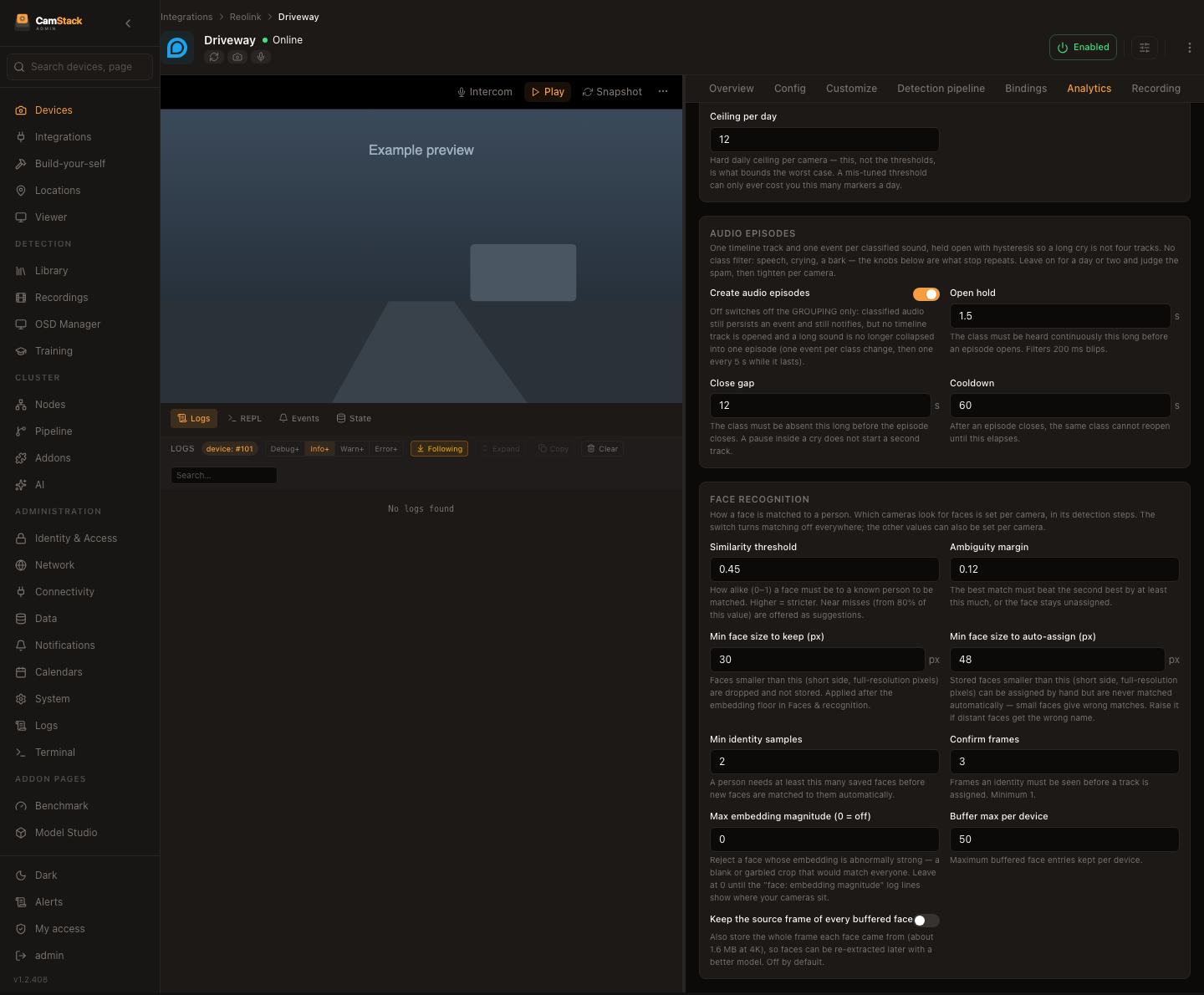
How strictly faces seen by this camera are matched. The master on/off is global; per camera, face production follows the camera's detection steps. Concepts and enrolment are on Enrichments.
| Setting | Default (schema default) | Range | Meaning |
|---|---|---|---|
| Similarity threshold | 0.45 | 0–1 (0.05) | How alike a face must be to a known person to match. Higher is stricter. Near misses (from 80 % of this value) are offered as suggestions. |
| Ambiguity margin | 0.12 | 0–1 (0.01) | The best match must beat the second best by this much, or the face stays unassigned. |
| Min face size to keep (px) | 30 | 0 and up | Faces smaller than this (short side, full-resolution pixels) are dropped and not stored. |
| Min face size to auto-assign (px) | 48 | 0 and up | Stored faces smaller than this can be assigned by hand but never matched automatically. Raise it if distant faces get the wrong name. |
| Min identity samples | 2 | 1 and up | A person needs this many saved faces before new faces are matched to them automatically. |
| Confirm frames | 3 | 1 and up | Frames an identity must be seen before a track is assigned. |
| Max embedding magnitude (0 = off) | 0 | 0 and up (0.5) | Rejects a face whose embedding is abnormally strong — a blank or garbled crop that would match everyone. Leave at 0 until the log lines show where your cameras sit. |
| Buffer max per device | 50 | 0 and up (10) | Face entries buffered per device. |
| Keep the source frame of every buffered face | off | Also store the whole frame each face came from (about 1.6 MB at 4K) so faces can be re-extracted with a better model later. |
Then
- Detection pipeline
- Notifications — what is sent about these events.
Recording
Every setting on a camera's Recording tab — the four modes, schedule bands and their triggers, which streams are recorded, retention, the camera's own card, and the clips list.
Cluster-wide analytics settings
The Pipeline Analytics settings that apply to every camera — semantic search index actions, battery and offline alerts, and retention windows — with defaults and ranges.