

Detection pipeline
Every setting of the Detection pipeline tab — the steps that run on a camera, and the motion, detection, tracking, parked-object, zone, audio and placement settings, with defaults and ranges.
This is the largest group of settings on a camera, and the one that decides what you are told about. Reach it with Devices → camera → Detection pipeline. It has two sub-tabs:
- Steps — what runs on each frame of this camera.
- Settings — how motion, detection, tracking, parked objects, audio and placement behave, in seven groups.
For the ideas behind these — the step tree, motion versus detection, tracks — read Detection, Tracks and tuning and How it works first. This page is the reference.
Steps
?tab=detection-pipeline&sub=steps. A table with one row per detection step
and one column per accelerator the camera can be balanced onto.
- The gate at the top of a step is Auto / On / Off and is saved at once. Auto follows the step's default.
- The model is chosen per accelerator, because each type of accelerator runs its own builds. Face recognition and semantic search use one model for the whole cluster and link to where it is changed.
- A step's settings are camera-wide by default. Applies to next to Save chooses All accelerators of this camera or This accelerator. Under each field you see where its value comes from — the camera, the node or the model's default.
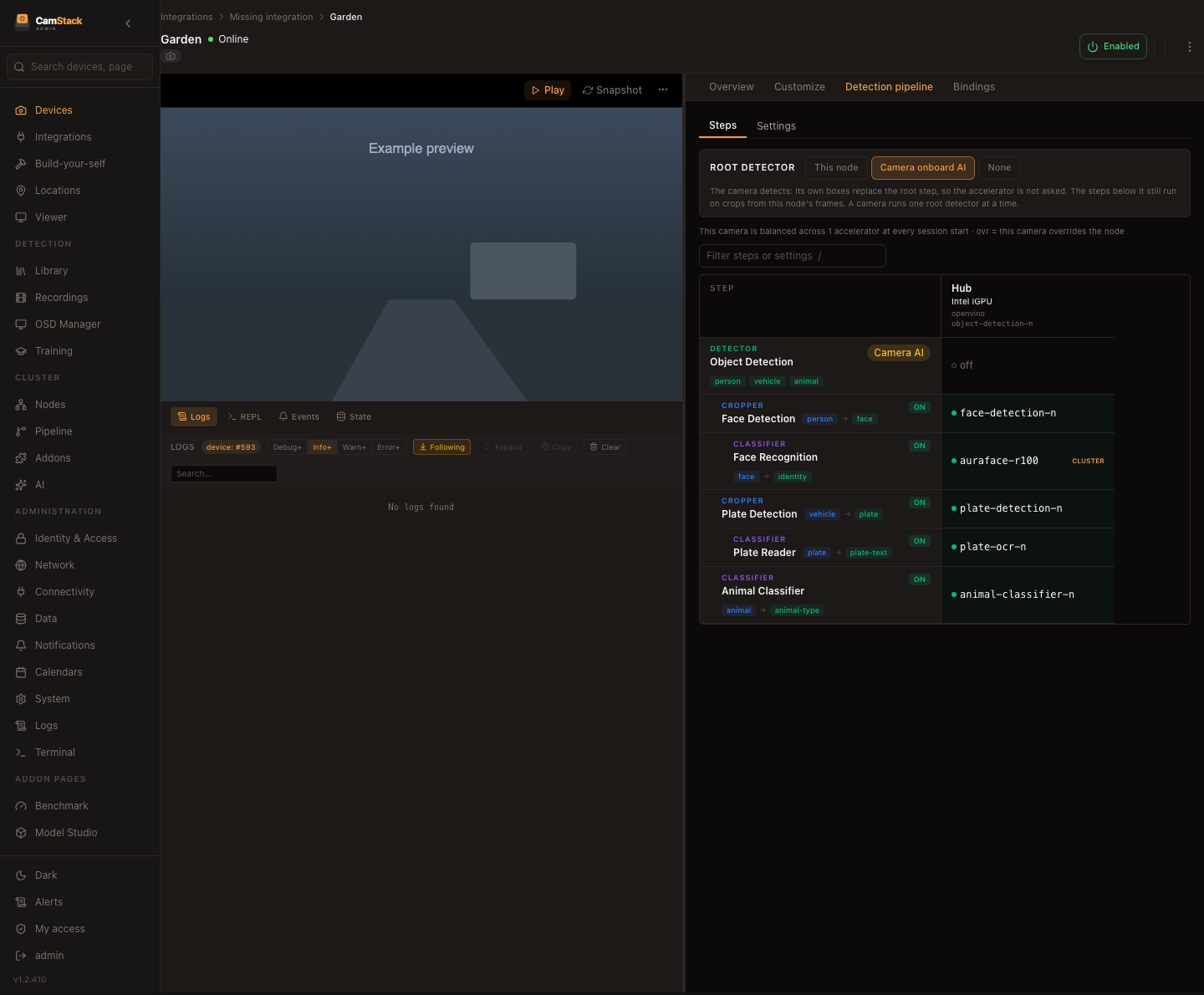
Detection source
The Steps table starts with one choice, Root detector, with three options:
- This node (default) — the ML root step runs on this node's decoded frames, and every step below it applies.
- Camera onboard AI — the camera's own detector replaces the root step. The root row is greyed and badged Camera AI; the accelerator is not asked for boxes, and the other steps stay editable and run on crops of this node's frames, so the track still gets its best shot, face, plate and embedding.
- None — the root step and every video step under it idle. Use it to keep the camera wired but detect nothing.
A camera has at most one root detector, so there is no "both". Cameras without an onboard detector show no control at all. A battery camera's boxes exist only while it is awake; a camera whose firmware sends a class with no box cannot serve as a root step, only as a wake signal. This replaces the old separate Detection sources settings section and the field on the Motion tab.
How the table works, with every control, is in Where you change a step.
Settings
?tab=detection-pipeline&sub=settings. Seven groups run along the top; the
number beside each is how many sections it holds. All groups share one Save
bar, so edits you make in several groups are saved together.
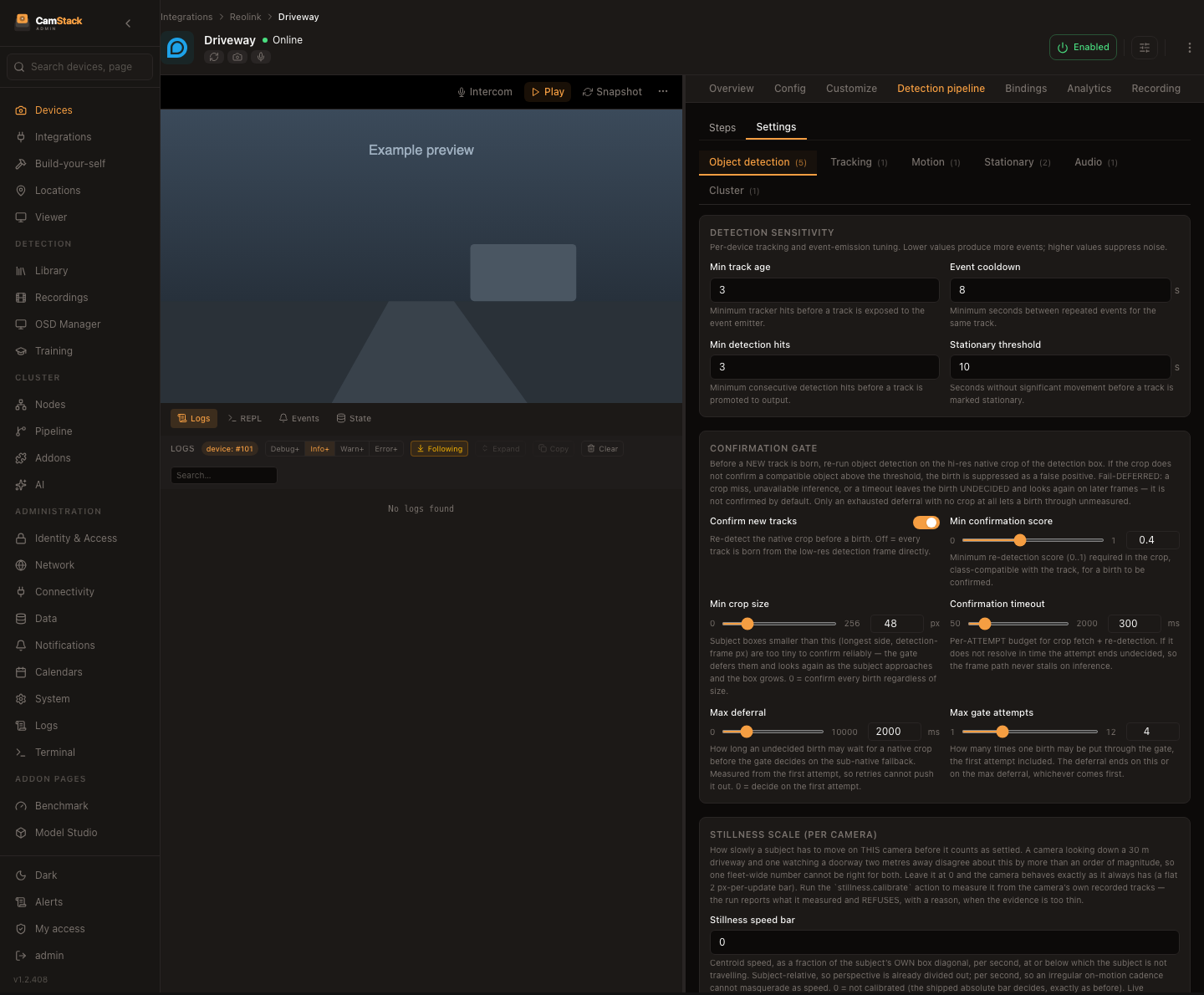
A camera that was never changed shows the cluster-wide value where one is set, else the default listed below. A group appears only when something in it applies to the camera.
Object detection
Four sections. Which detector produces the boxes (this node, the camera's own AI, or none) is chosen on the Steps sub-tab, not here.
Object detection — when the detector runs, and how hard.
| Setting | Default (schema default) | Range | Meaning |
|---|---|---|---|
| Object detection | On motion | Disabled · Always on · On motion | When the ML detector runs. On motion attaches when motion fires and releases when it stops. Always on runs continuously. Disabled leaves the camera wired but nothing is detected. Battery cameras also default to On motion. |
| Detection Stream | High | High · Medium · Low | Which stream slot detection reads. Moving to Medium is the largest single cost reduction; the price is range — small and distant objects go first. |
| Detection FPS | 10 fps | 1–30 | The most frames per second decoded and sent to the detector. |
| Detection FPS while the device is working | 1 fps | 1–10 | Only shown when Device activity is a motion source (a robot that reports when it is cleaning). Caps the rate for a session opened by the device itself, which lasts as long as the job. |
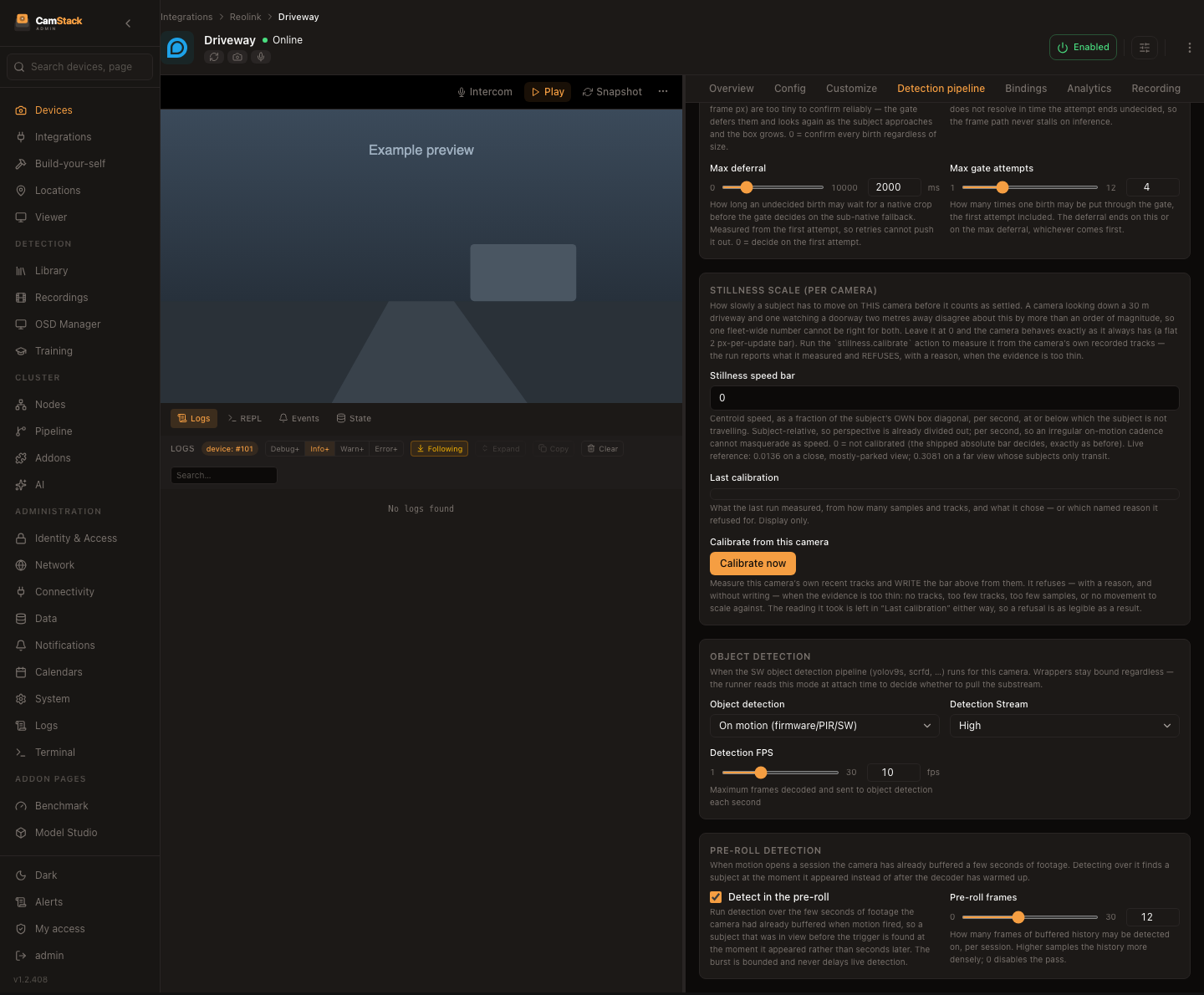
Pre-roll detection — when motion opens a session the camera has already buffered a few seconds. Detecting over it finds a subject at the moment it appeared instead of after the decoder warmed up.
| Setting | Default (schema default) | Range | Meaning |
|---|---|---|---|
| Detect in the pre-roll | on | on / off | Run detection over the buffered footage when motion fires. Bounded, and never delays live detection. |
| Pre-roll frames | 12 | 0–30 | Frames of history that may be detected on per session. 0 turns the pass off. |
If tracks start late on a camera that has the pre-buffer on, this is the place to look. See also the pre-buffer on Config → Stream Broker.
Detection sensitivity — when a track may become an event.
| Setting | Default (schema default) | Range | Meaning |
|---|---|---|---|
| Min track age | 3 | 0 and up | Tracker hits before a track is shown to the event emitter. |
| Event cooldown | 8 s | 0.5 s and up | Shortest gap between repeated events for the same track. |
| Min detection hits | 3 | 1 and up | Consecutive detections before a track is promoted. |
| Stationary threshold | 10 s | 0.5 s and up | Time without significant movement before a track is marked stationary. |
Lower values produce more events; higher values suppress noise.
Confirmation gate — a second opinion on every new object, run on a full-resolution crop before a track is born (how it works).
| Setting | Default (schema default) | Range | Meaning |
|---|---|---|---|
| Confirm new tracks | on | on / off | Re-detect the native crop before a birth. Off, every track is born from the low-resolution detection frame directly. |
| Min confirmation score | 0.4 | 0–1 (0.05) | Minimum re-detection score, class-compatible with the track, for a birth to be confirmed. Raise this for ghost objects that survive the main threshold. |
| Min crop size | 48 px | 0–256 (8) | Boxes smaller than this (longest side) are too tiny to confirm; the gate defers them and looks again as the subject approaches. 0 confirms regardless of size. |
| Confirmation timeout | 300 ms | 50–2000 (50) | Budget for one attempt (crop fetch plus re-detection). If it runs out the attempt ends undecided. The frame path never stalls on inference. |
| Max deferral | 2000 ms | 0–10 000 (250) | How long an undecided birth may wait for a native crop before the gate decides on the lower-resolution fallback. 0 decides on the first attempt. |
| Max gate attempts | 4 | 1–12 | How many times one birth may go through the gate. The deferral ends on this or on Max deferral, whichever comes first. |
When the gate cannot measure, it lets the object through rather than risk missing something real — a deliberate choice.
Stillness scale (per camera) — how slowly a subject has to move on this camera before it counts as settled.
| Setting | Default (schema default) | Range | Meaning |
|---|---|---|---|
| Stillness speed bar | 0 (not calibrated) | 0–1 (0.001) | Speed, as a fraction of the subject's own box diagonal per second, at or below which it is not travelling. 0 uses the built-in absolute bar. |
| Last calibration | — | read-only | What the last calibration measured, or why it refused. |
| Calibrate now | — | action | Measures this camera's recent tracks and writes the bar from them. It refuses, with a reason and without writing, when evidence is thin: no tracks, too few tracks, too few samples, or no movement. |
Run Calibrate now after the camera has seen a few days of ordinary traffic, not on the day you install it.
Tracking
How boxes become tracks. Defaults suit most cameras; change one value at a time and give it real traffic before judging it.
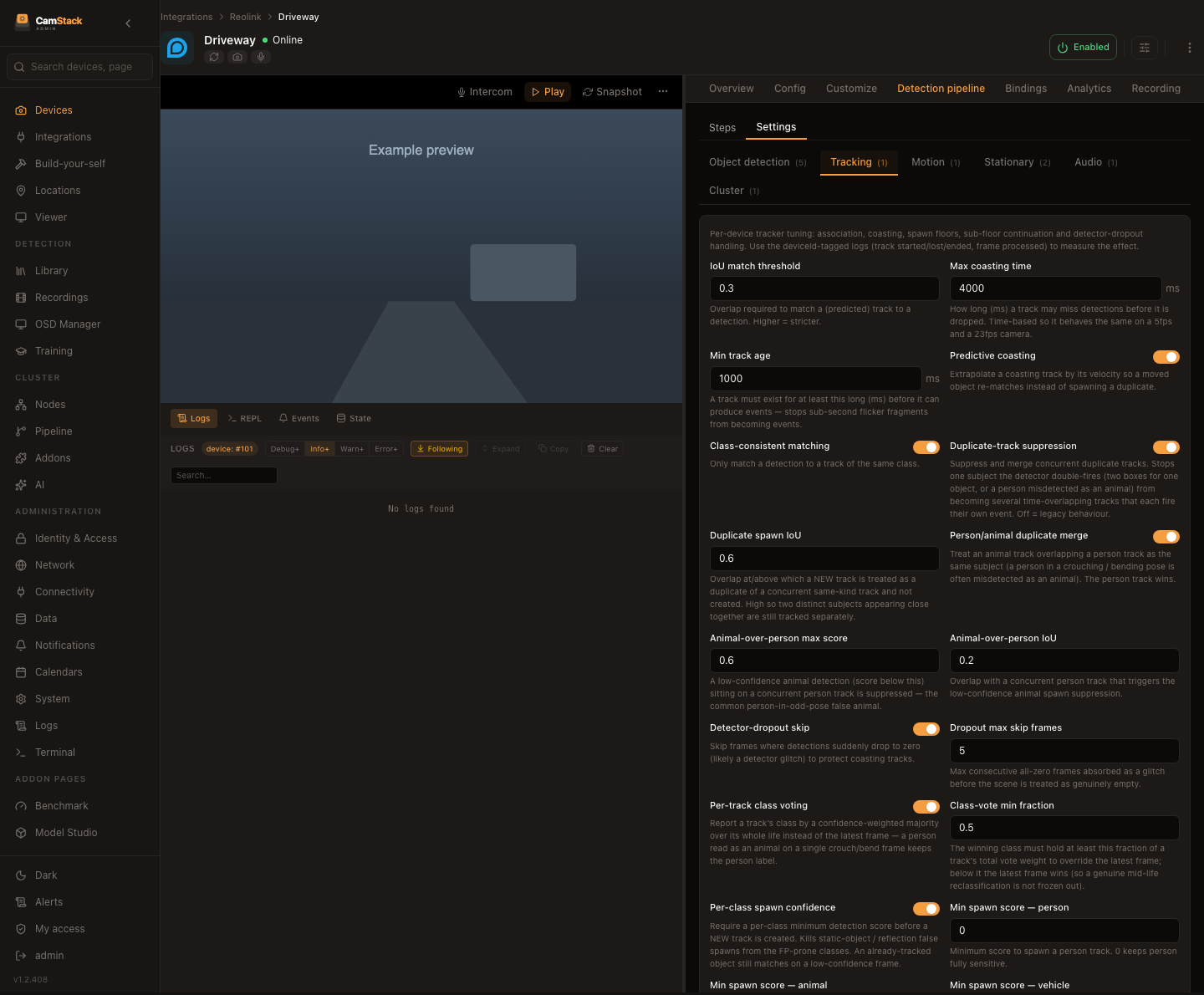
Matching and survival
| Setting | Default (schema default) | Range | Meaning |
|---|---|---|---|
| IoU match threshold | 0.3 | 0–1 (0.05) | Overlap needed to match a predicted track to a detection. Higher is stricter. |
| Max coasting time | 4000 ms | 0 and up | How long a track may miss detections before it is dropped. Time-based, so it behaves the same on a 5 fps and a 23 fps camera. Raise first when one person becomes several events. |
| Min track age | 1000 ms | 0 and up | A track must exist this long before it can produce events; stops flicker fragments. |
| Predictive coasting | on | Extrapolate a coasting track by its velocity so a moved object re-matches instead of spawning a duplicate. | |
| Class-consistent matching | on | Match a detection only to a track of the same class. | |
| Sub-floor recovery IoU | 0.2 | 0–1 | IoU a below-threshold box needs with a moving track's prediction to re-attach to it. |
| Keep tracks through low-confidence frames | on | Boxes below the class floor may keep an existing track alive while the detector is unsure. They never start a track and never produce events, notifications or snapshots. | |
| Low-confidence continuation floor | 0.35 | 0–1 | Score at or above which such a box still counts as evidence. |
Duplicates and class flips
| Setting | Default (schema default) | Range | Meaning |
|---|---|---|---|
| Duplicate-track suppression | on | Merge concurrent duplicate tracks (two boxes for one object). | |
| Duplicate spawn IoU | 0.6 | 0–1 | Overlap at or above which a new track is a duplicate of a concurrent one and is not created. High, so two nearby subjects stay separate. |
| Person/animal duplicate merge | on | An animal track overlapping a person track is treated as the same subject; the person wins (a crouching person is often read as an animal). | |
| Animal-over-person max score | 0.6 | 0–1 | A low-confidence animal detection below this, on a person track, is suppressed. |
| Animal-over-person IoU | 0.2 | 0–1 | Overlap with a person track that triggers that suppression. |
| Person/animal group matching | on | A detection flipping between person and animal for a frame re-matches its track instead of spawning a second. | |
| Per-track class voting | on | A track's class is a confidence-weighted majority over its whole life, not the latest frame. | |
| Class-vote min fraction | 0.5 | 0–1 | The winning class needs at least this share of the vote to override the latest frame. |
Detector glitches
| Setting | Default (schema default) | Range | Meaning |
|---|---|---|---|
| Detector-dropout skip | on | Skip frames where detections suddenly drop to zero, to protect coasting tracks. | |
| Dropout max skip frames | 5 | 0 and up | Consecutive all-zero frames absorbed as a glitch before the scene counts as empty. |
Spawn floors — what a new track must clear. An already-tracked object still matches on a weak frame.
| Setting | Default (schema default) | Range | Meaning |
|---|---|---|---|
| Per-class spawn confidence | on | Require a per-class minimum score before a new track. | |
| Min spawn score — person / animal / vehicle | 0 / 0.45 / 0.45 | 0–1 (0.05) | Minimum score to start a track of that class. Animals and vehicles are prone to false positives from static objects and reflections, so their floor is higher. |
| Minimum spawn size | on | Require a new track's box to cover a minimum fraction of the frame. | |
| Min spawn area — person / animal / vehicle | 0.0005 / 0 / 0 | 0–1 (0.0005) | Smallest box, as a fraction of the frame area, that may start a track. 0 is ungated. The person default (0.05 % of the frame) drops only vanishing-point noise; raise it on cameras with a distant road or horizon. |
| Fast high-confidence confirm | off | Let one very-confident detection confirm a track before the min-hits gate, so a car crossing in one or two frames still registers. | |
| Fast-confirm score | 0.9 | 0–1 | The score that confirms immediately. Used only when the option above is on. |
Zones and diagnostics
| Setting | Default (schema default) | Range | Meaning |
|---|---|---|---|
| Zone membership minimum overlap | 0 | 0–1 (0.05) | How much of a detection's box must lie inside a zone for the detection to be stamped with it, as a fraction of the box, not of the zone. 0 stamps on any touch. Only a stamped zone can match a zone-scoped notification rule. See Zones. |
| Record the track history (kept 1 day) | off | Continuously write what the tracker is given on this camera (boxes, classes, scores, never pixels) so a track that went wrong can be turned into a test case within a day. About 43–72 MB per day per camera. Shown on the camera only, never on the global page. |
Motion
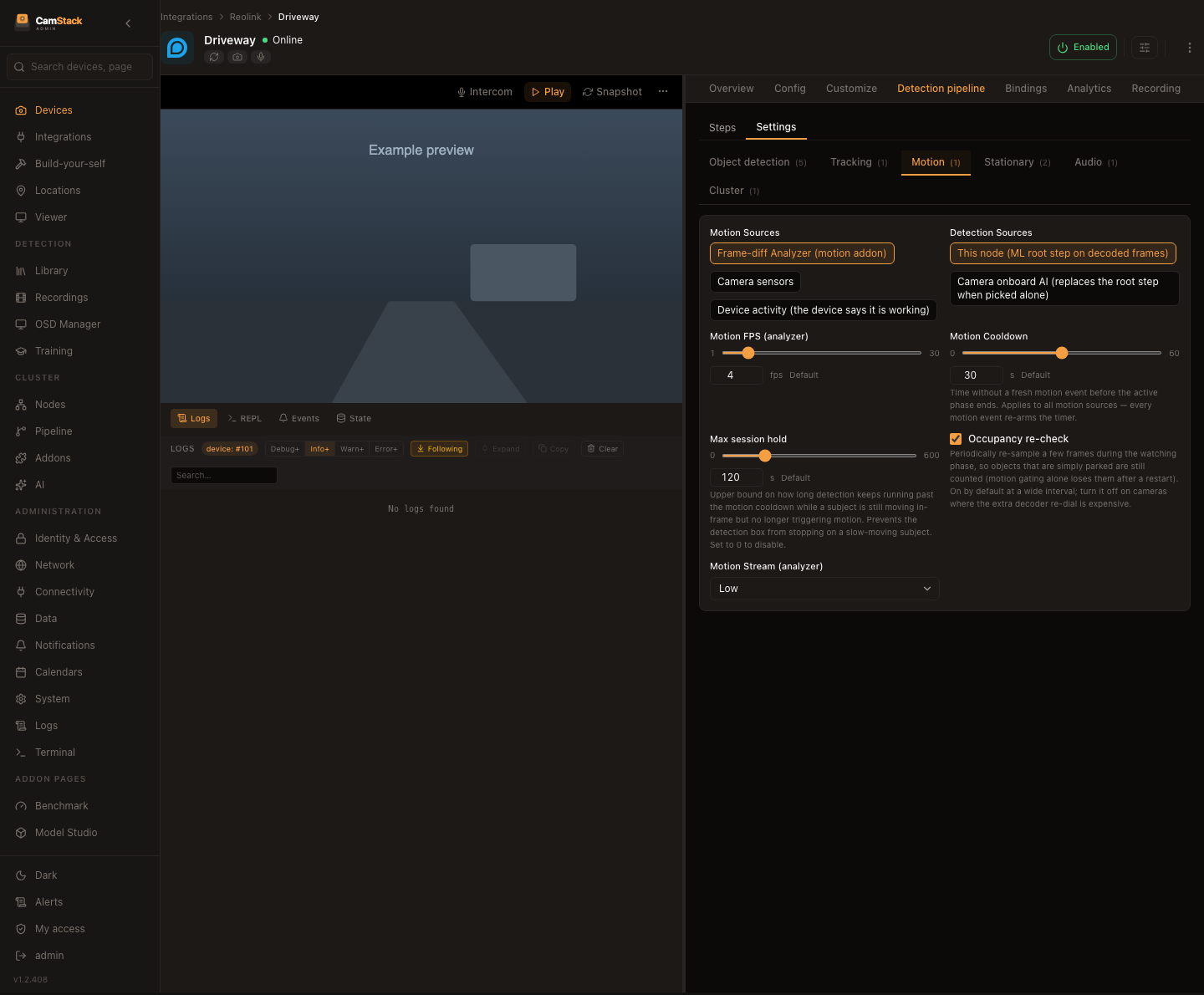
Motion decides when detection is worth running. It is a cheap gate and is wrong about what moved; let it be generous and let detection and zones filter.
| Setting | Default (schema default) | Range | Meaning |
|---|---|---|---|
| Motion Sources | see below | one or more | What can raise motion. |
| Motion FPS (analyzer) | 4 fps | 1–30 | Frames per second the frame-difference analyzer samples. Shown when the analyzer is a motion source. |
| Motion Cooldown | 30 s | 0–60 s (0.5) | Time without a fresh motion event before the active phase ends. Applies to every source: each motion event re-arms the timer. |
| Max session hold | 120 s | 0–600 s (5) | Longest detection keeps running past the cooldown while a subject is still moving in frame but no longer triggering motion. Stops the box from freezing on a slow-moving subject. 0 disables. |
| Occupancy re-check | on | Periodically re-sample a few frames while the camera is watching, so parked objects are still counted. Interval and frames are in Stationary. Turn it off on cameras where the extra decoder re-dial is expensive. | |
| Run motion analyzer on onboard motion | on | Shown when Camera sensors is a source. When the camera reports motion, start the analyzer for the cooldown window so zone results exist. | |
| Audio window after motion | 90 s | 5–600 s (5) | Shown when audio is On motion. How long audio keeps being analysed after the last motion event. |
| Motion Stream (analyzer) | Low | High · Medium · Low | The stream the analyzer reads. Shown when the analyzer is a source. |
Motion Sources:
- Frame-diff Analyzer (motion addon) — Dominevo compares frames. Costs decode and CPU on the node; its tuning is in Config → Motion.
- Camera sensors — the camera's own motion, plus any sensor attached under Customize. Free: no decode needed.
- Device activity (the device says it is working) — for devices that report when they are busy, such as a robot.
When you have not chosen, the default is: Camera sensors if the camera reports its own motion; none if the camera is battery-powered (it is woken by its own signals instead); otherwise the Frame-diff Analyzer. A device that reports its own activity also gets Device activity.
Stationary
How objects that stop moving are handled. Two sections.
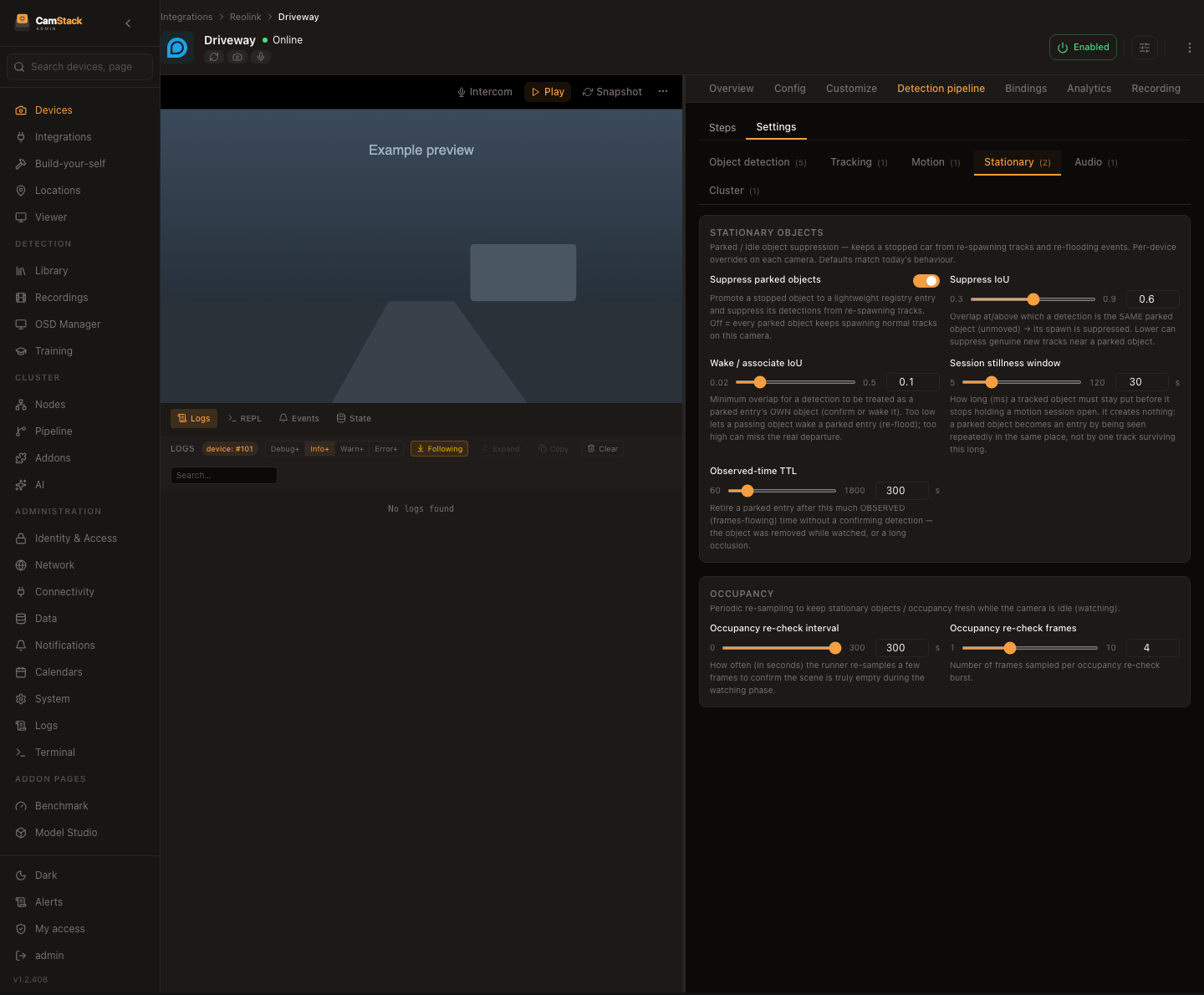
Stationary objects — a stopped object becomes a light entry in a registry, and its detections no longer respawn tracks.
| Setting | Default (schema default) | Range | Meaning |
|---|---|---|---|
| Suppress parked objects | on | Off, every parked object keeps spawning normal tracks on this camera. | |
| Suppress IoU | 0.6 | 0.3–0.9 (0.05) | Overlap at or above which a detection is the same parked object. Lower can suppress genuine new tracks near a parked object. |
| Wake / associate IoU | 0.1 | 0.02–0.5 (0.02) | Minimum overlap for a detection to be a parked entry's own object. Too low lets a passing object wake a parked entry; too high can miss the real departure. |
| Session stillness window | 30 s | 5–120 s | How long a tracked object must stay put before it stops holding a motion session open. It creates nothing. |
| Observed-time TTL | 300 s | 60–1800 s | Retire a parked entry after this much observed time without a confirming detection. |
Occupancy — periodic re-sampling to keep counts fresh while the camera is idle. Active when Occupancy re-check (in Motion) is on.
| Setting | Default (schema default) | Range | Meaning |
|---|---|---|---|
| Occupancy re-check interval | 300 s | 0–300 s (5) | How often the runner re-samples a few frames to confirm the scene is truly empty. Each re-check re-dials the stream, so keep it wide. |
| Occupancy re-check frames | 4 | 1–10 | Frames sampled per burst. |
If a parked car keeps reappearing as a new event, first check that Suppress parked objects is on and the car sits in a zone you care about.
Zones
The zone editor: draw polygons on the camera image, set include/exclude rules per pipeline stage, class filters, overlap thresholds and tripwires. Everything about it is on Zones. The group is present on every camera, and zones apply on the next frame.
Audio
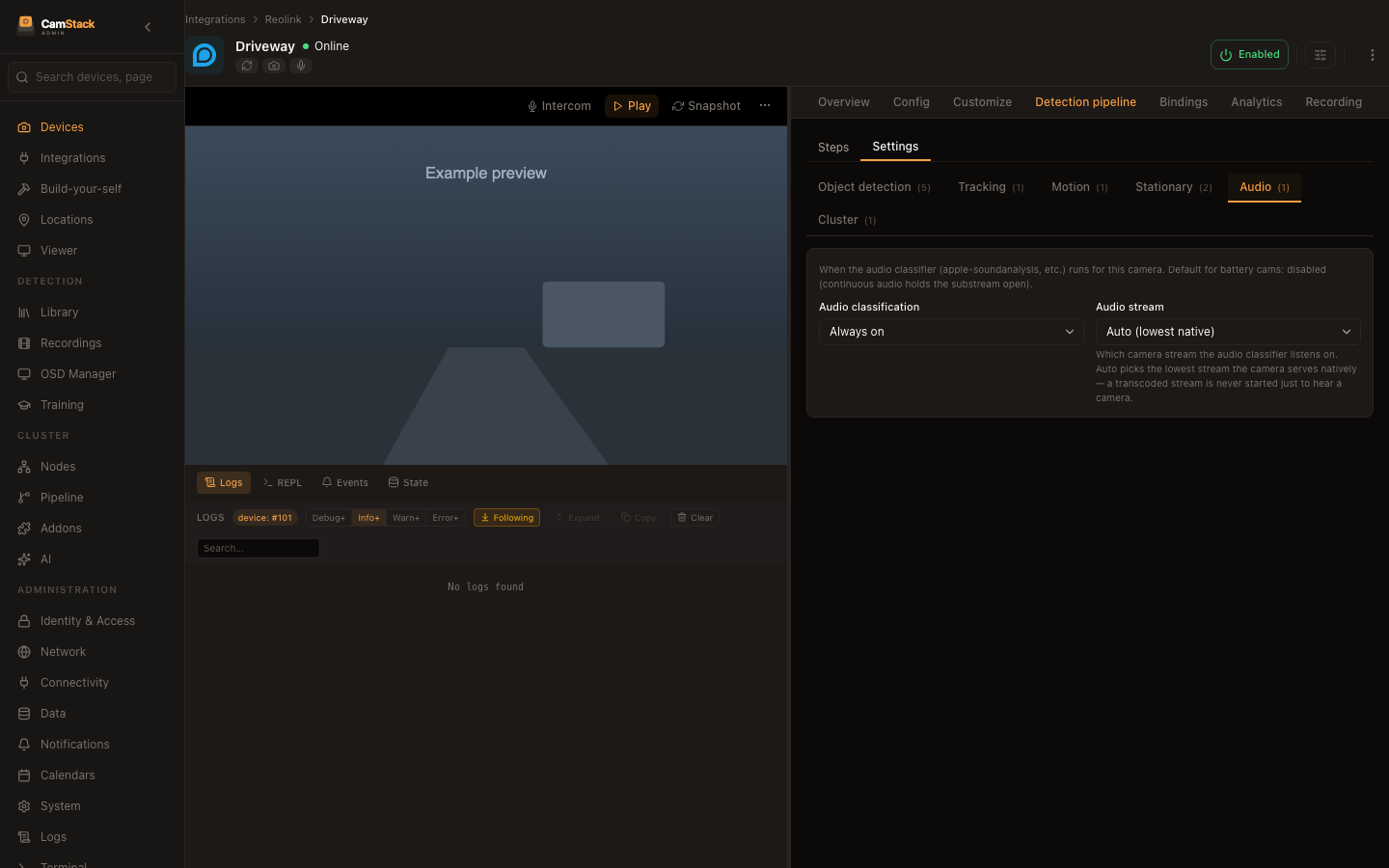
| Setting | Default (schema default) | Range | Meaning |
|---|---|---|---|
| Audio classification | Always on (Disabled on a battery camera) | Disabled · Always on · On motion | When the audio classifier listens. Continuous audio holds a battery camera's stream open, which is why that profile defaults to off. |
| Audio stream | Auto (lowest native) | Auto · High · Medium · Low | Which stream the classifier listens on. Auto picks the lowest stream the camera serves natively — a transcoded stream is never started just to hear the camera. An explicit choice is obeyed; if the camera stops offering it, the classifier refuses by name rather than switching. |
What counts as an audio event (confidence, which sounds, how many hits) is set in Analytics; the microphone itself is switched in the header → Camera functions.
Cluster
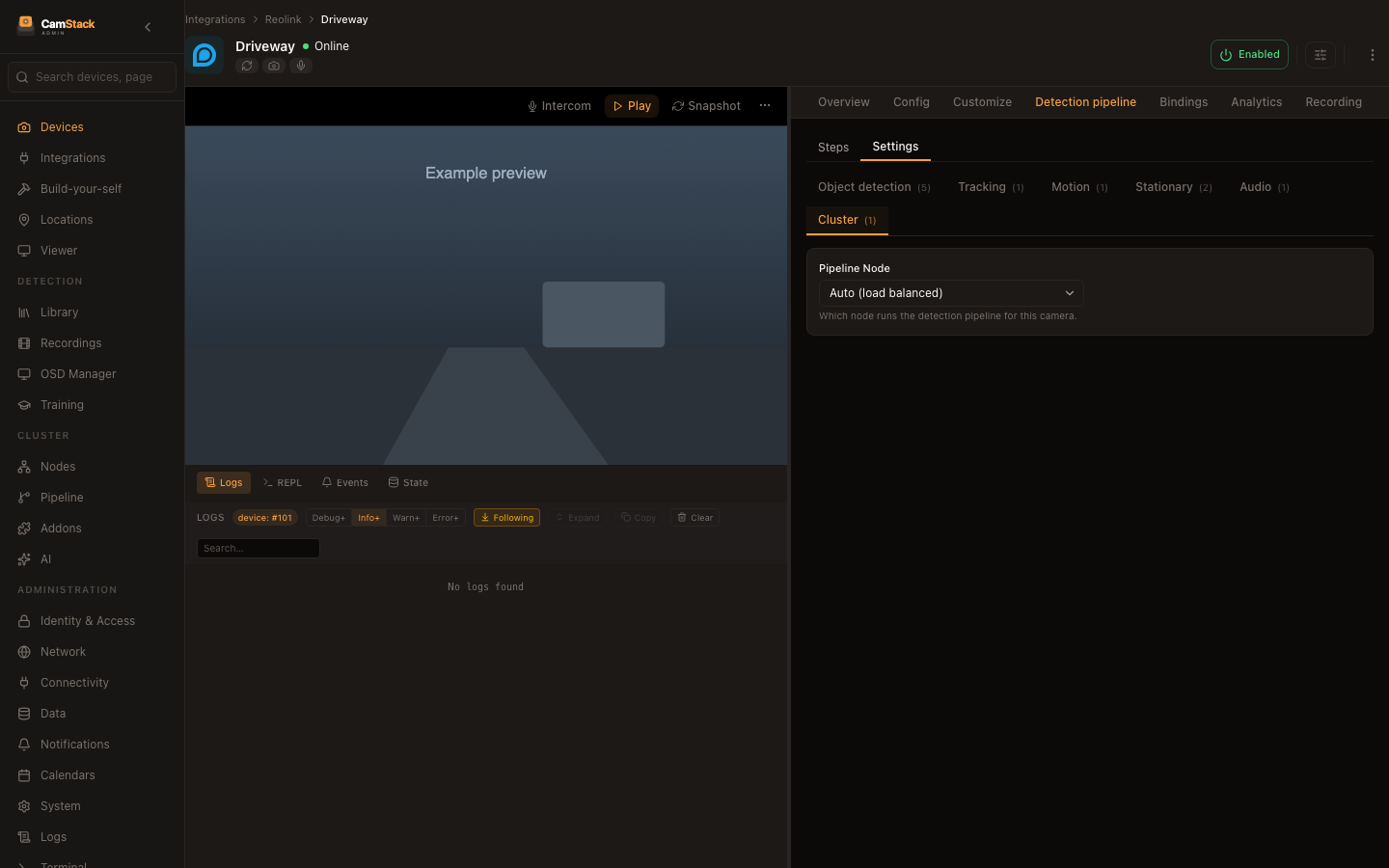
| Setting | Default (schema default) | Meaning |
|---|---|---|
| Pipeline Node | Auto (load balanced) | Which node runs this camera's detection pipeline. Auto lets the balancer decide; a node name pins the camera to it. Saving stores the pin; the camera moves at the next dispatch or rebalance, not instantly. The Pipeline page's assign action moves it at once. |
| Pipeline Status (read-only) | — | The runner this camera is on now, and why (pinned or the balancer's reason). |
Pin a camera only for a reason — the node has the accelerator the model needs, or the camera is on that node's network. Everything else is better left to the balancer. See Cluster.
Then
- Zones
- Tracks and tuning — which knob for which symptom.
- Analytics — what is kept about detections.
Config
The Config tab of a camera — image and day/night, motion on the camera, snapshots, encoder settings, the stream broker, and the sections each integration adds.
Recording
Every setting on a camera's Recording tab — the four modes, schedule bands and their triggers, which streams are recorded, retention, the camera's own card, and the clips list.