

Reolink cameras
The sections a Reolink camera adds to its page — scheduled refresh and sleep push for battery cameras, on-camera motion and AI sensitivity, image, audio, network and advanced settings.
Every integration adds its own sections to a camera's Config tab. Reolink adds the most, because Dominevo talks to these cameras in Reolink's own protocol. This page lists them; the generic tabs are on Config, and what Reolink offers compared with other vendors is on Vendor notes.
A section appears only when the camera model supports it, and values shown on first open are what the camera reports. Writes go to the camera; on a battery camera a write wakes it, so the form can take several seconds to confirm.
Battery cameras
Scheduled refresh
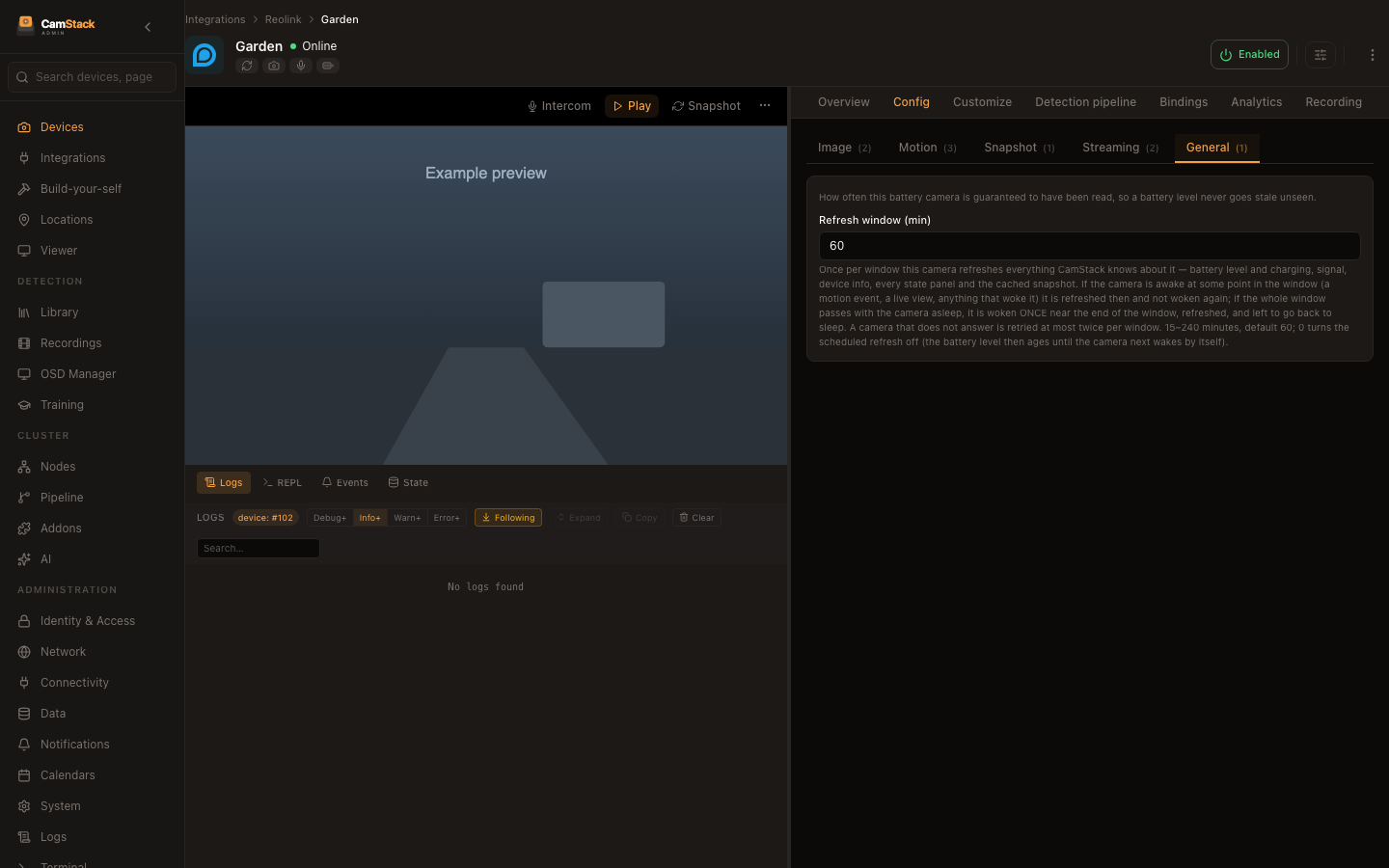
Shown on battery cameras only. Once per window the camera refreshes everything Dominevo knows about it — battery level and charging, signal, device info, every state panel and the cached snapshot — so a battery level never goes stale unseen.
| Setting | Default | Range | Meaning |
|---|---|---|---|
| Refresh window (min) | 60 | 0, or 15–240 (step 5) | If the camera is awake at some point in the window (a motion event, a live view, anything that woke it) it is refreshed then and not woken again. If the whole window passes with the camera asleep, it is woken once near the end, refreshed, and left to go back to sleep. A camera that does not answer is retried at most twice per window. 0 turns the scheduled refresh off; the battery level then ages until the camera next wakes by itself. Values below 15 are treated as 15, above 240 as 240. |
Leave it at 60 for most cameras. Lengthen it for a camera whose battery you are trying to stretch, knowing the level on screen will be older; do not set it to 0 for a camera you rely on a low-battery notification from.
Battery motion (sleep push)
A sleeping battery camera cannot be polled, so it pushes motion to Dominevo. On a standalone battery camera (not one behind a Reolink hub), Preferred sleep-push path chooses how:
| Option | Meaning |
|---|---|
| Auto (webhook if supported, else email) | Default. |
| HaCfg webhook only | The camera calls Dominevo directly. |
| Email/SMTP only | The camera sends a mail to Dominevo's mail receiver. |
Only one path should be armed. Two buttons — HaCfg webhook and Email push — configure the camera for that path in one click. The Email tab shows the camera's mail settings (SMTP server and port, user name, password, SSL/TLS, sender name, up to three recipients, and the alarm schedule); the password is masked and never echoed back — blank leaves it as is.
Fully local battery cameras
A battery camera can run with no Reolink cloud at all: the control channel goes straight to the camera over UDP, and motion arrives by mail to Dominevo. Once that works, you can block the camera's internet access. This setup has been tested with a battery camera on its own VLAN with internet blocked: it was added, streamed and recorded with no cloud.
- Control channel. When you add the camera, set UDP discovery to
Local only (direct to the camera IP). The default Auto tries every
method at once and quietly settles on the Reolink relay whenever the direct
one gets no answer, so a camera that works through the relay may still be
leaving your network. The device's connect line in the logs says which path is
in use (
udpDiscoveryMethod=local-directorrelay). - Camera on another subnet or VLAN. Add a firewall rule that allows UDP
from the camera to Dominevo on any port. Allowing only the return traffic of
Dominevo's request is not enough: the camera answers from a port the firewall
does not count as a reply, and the session then moves to new ports. Without
the rule the log shows
local discovery timeout ... replies=0and Auto falls back to the relay. The camera refuses TCP on its Baichuan port, so TCP cannot be used instead. - Block the internet. With the rule in place and the connect line showing
local-direct, block the camera's internet access. Leave DNS and NTP open if the camera uses them. - Motion. Choose Email/SMTP only above and allow the camera to reach Dominevo's mail receiver (TCP port 2525 by default).
- Changing an existing camera. Switching the connection mode or discovery method drops the old connection, including a connection attempt still in progress, and reconnects the new way.
Motion
| Setting | Default | Range | Meaning |
|---|---|---|---|
| Motion detection | as the camera reports (usually on) | on / off | Master switch of the camera's own motion detector. Off, the camera stops sending motion events. |
| Sensitivity | as the camera reports (25 if unset) | 1–50 | Higher triggers on smaller motion. Dominevo shows the same scale as the Reolink app. |
AI detection sensitivity
One group per kind the camera detects — people, vehicle, animal, face, package. A kind appears only if the camera does it.
| Setting | Default | Range | Meaning |
|---|---|---|---|
| … sensitivity | as reported (50 if unset) | 0–100 | How readily the camera calls something that kind. |
| … stay time (s) | as reported (0 if unset) | 0–600 | Seconds the camera keeps the alarm asserted after the object leaves the frame. |
| … min / max target width / height | 0 / 1 | 0–1 | Smallest and largest object, as a fraction of the frame, that the camera's AI considers. Smaller or larger objects are ignored by the camera. |
These tune what the camera reports. They matter when you use the camera's onboard AI as a motion source or as the detector (Detection sources); Dominevo's own detection is tuned on the Detection pipeline tab.
Image, IR and focus
| Section | Settings |
|---|---|
| Image | Brightness, Contrast, Saturation, Hue, Sharpness — sliders 0–255, default as reported (128). |
| Advanced (ISP) | Day/Night mode (camera-specific values, commonly auto, color, blackAndWhite) and Exposure (commonly auto, manual). |
| IR + status LED | IR LED — Auto (camera decides), Always on, Always off; IR brightness 0–255 (only where programmable; many models clamp to 0–100); Status LED; Doorbell LED (doorbell models). |
| Auto focus | On or off, on cameras with a motorized lens. |
Audio
| Setting | Default | Range | Meaning |
|---|---|---|---|
| Speaker volume | 50 | 0–100 (5) | The camera's speaker. |
| Talk + reply volume | 50 | 0–100 (5) | Two-way audio and canned replies; doorbell models. |
| Visitor volume | 50 | 0–100 (5) | Visitor and chime playback; doorbell models. |
| Noise reduction level | as reported | 0–3 | 0 off, 1 low, 2 medium, 3 high. |
Intercom tuning (two-way talk):
| Setting | Default | Range | Meaning |
|---|---|---|---|
| Blocks per payload | 1 | 1–8 | Lower is lower latency, with more sends per second. |
| Max backlog (ms) | 120 | 20–5000 | Audio queued before the oldest is dropped to cap latency. Higher is steadier on a slow system, with more delay. |
| Output gain | 1.0 | 0.1–10 | Multiplier on the outgoing audio. 2.0 is about +6 dB, 0.5 about −6 dB. Hard-clipped. |
Network, time and connection
| Section | Settings |
|---|---|
| Connection | Camera IP, Port (default 9000), Username (default admin), Password. Give Dominevo its own account on the camera. |
| Service ports | Enable and port for HTTP (80), HTTPS (443), RTSP (554), RTMP (1935) and ONVIF (8000), as the camera reports. Turning off RTSP or ONVIF here removes a way Dominevo and other tools can reach the camera. |
| Time / NTP | Timezone (pushes the zone's UTC offset and daylight-saving rule to the camera), NTP sync, NTP server (pool.ntp.org), NTP port (123), Sync interval (min, 1–10080, default 1440). |
Advanced
| Setting | Default | Meaning |
|---|---|---|
| Keyframe interval (s) | 4 (as reported) | 1–10 s between keyframes on the main stream. |
| PIR detection → Reduce false alarms | off | The camera's own PIR false-alarm reduction. |
| Auto reboot | off | A weekly or daily reboot: Day (every day or one weekday), Hour (0–23, default 3) and Minute (0–59, default 0). |
| Debug | off | General debug logs and Socket trace categories (RTSP, native stream, recordings, talkback and more). Each adds log volume; turn on only to diagnose. |
Refresh from camera (under Camera data) re-reads these values from the camera if you changed them outside Dominevo.