

Tokens
Every credential in one place — scoped tokens for scripts, admin tokens for maintenance, share links, linked apps, sign-in links, the authentication audit — and how to revoke one or several safely.
Administration → Identity & Access → Tokens & sessions.
This page lists every credential the hub honours, one kind at a time. Pick a kind from the pills under the title:
| Group | Kind | What it is |
|---|---|---|
| Sessions | Login sessions | Every browser and app signed in, for every user. See Sessions and signing out. |
| Sessions | Linked apps | Outside services linked through an account-link (OAuth) flow, e.g. Alexa. |
| Tokens | Scoped tokens | Tokens for scripts and integrations — below. |
| Tokens | Admin tokens | Tokens for maintenance scripts — below. |
| Tokens | Share links | Every user's view-only links. See Share links. |
| Tokens | Legacy API keys | Shown only while some still exist. |
| Identity | Sign-in links | The single sign-on accounts each user linked to their Dominevo account. |
| Identity | Audit | The authentication audit trail. |
The kind you pick is in the address (?tab=access&integration=share-links),
so a bookmark opens it directly. Old links to the Tokens and Linked
Sessions tabs open the matching kind here.
Every kind is the same table: Name, Owner, Kind / scope, Status, Created, Last used, Expires, and the row's action. Click a column header to sort (again to reverse, a third time to clear — "Never" always sorts last), search, and filter with the Status, Owner and Kind chips. Long lists show 25 rows a page.
Scoped tokens
A scoped token lets a script, a dashboard or another system call the Dominevo API without a password. It is sent as a bearer token:
curl -H "Authorization: Bearer $DOMINEVO_TOKEN" https://hub.example.com:4443/trpc/…Every method, the tier and scope it needs, and the wire format are in the HTTP API reference.
Creating one
Scoped tokens → New token:
| Field | Meaning |
|---|---|
| Name | A label you will recognise in the list, e.g. home-dashboard. |
| On behalf of user | The user the token acts as. Its access never exceeds that user's. |
| Scopes | What the token may reach: a capability, an addon, a device set or a category, each with view, create and/or delete access. |
| Expires in (days) | Required — at most 90. Only a share link may never expire. |
The token is shown once, when it is created. Copy it then — Dominevo does not keep it and cannot show it again.
What a token can and cannot do
- A token reaches only its scopes, and only within what its user may do.
- A token is never an admin, whatever user it belongs to: administration (users, tokens, addons, cluster, secrets) is always refused to it. Use a signed-in admin session, or an admin token for a script.
- A token cannot create, list or revoke share links.
Give each script its own token with the narrowest scopes and an expiry, so revoking one breaks only that script.
Revoking
The Scoped tokens table lists every user's tokens — filter by Owner to see one user's. Revoke invalidates a token on its next use. Scoped tokens are revoked one at a time.
Admin tokens
A scoped token can never act as an administrator. A maintenance script that must — a migration, an update run — uses an admin token instead.
An admin token can do anything an administrator can. Give it the shortest expiry that works, keep it in a file only you can read, and revoke it when the job is done.
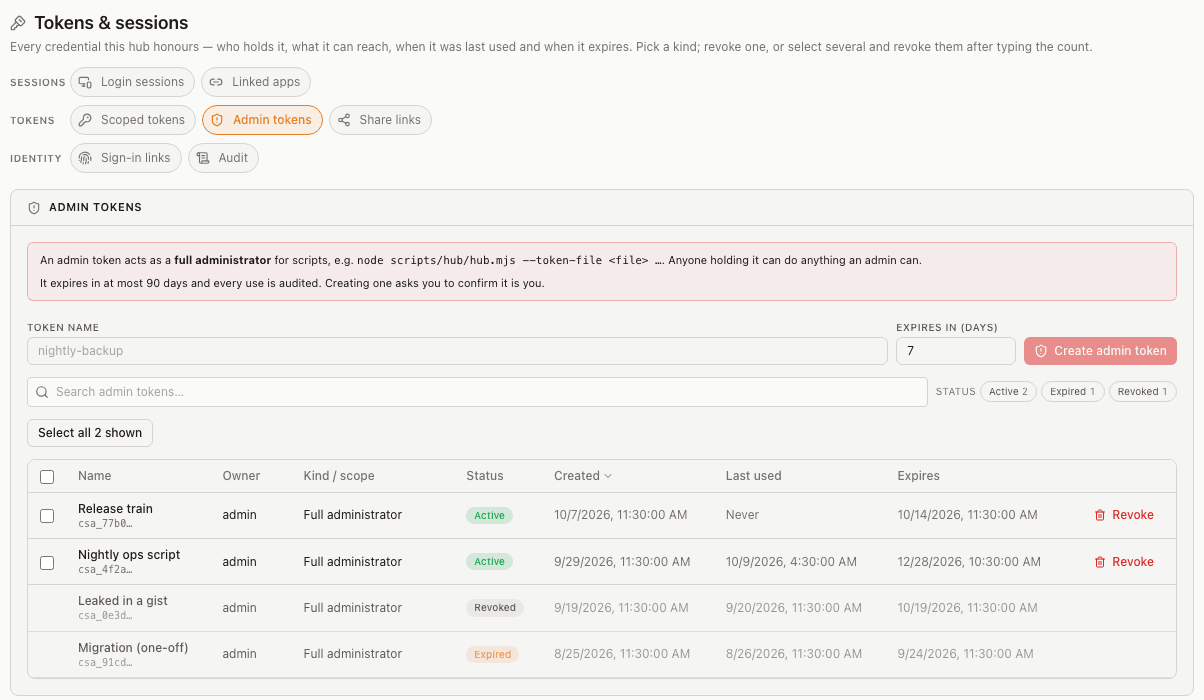
Identity & Access → Tokens & sessions → Admin tokens: enter a Token name and Expires in (days), then Create admin token (admins only):
- you confirm with your password or a passkey first;
- Expires in (days) is mandatory — at most 90, 7 by default;
- the token is shown once.
Every request made with it is recorded in the Audit, with the address it came from. It stops working when you Revoke it, when it expires, or when the admin who created it is deleted or is no longer an admin. It does not depend on anyone being signed in.
Revoking several at once
Login sessions, Admin tokens and Share links can be revoked together. It always takes three steps, so a wrong click cannot empty a list:
- Select the rows: tick them, tick the header box for the rows on this page, or use Select all N shown after filtering — for example Status: Expired. Select expired does the same in one click. Selecting never revokes anything.
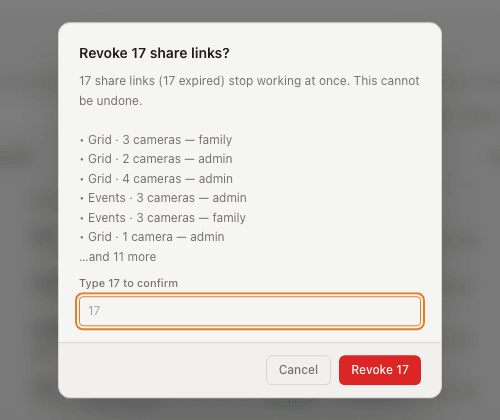
- Revoke N … opens a confirmation that lists the first rows and how many are active or expired.
- Type the number of selected items to confirm.
- Only the rows you selected and can still see are revoked: rows a filter hides are left alone.
- Your own session is never included — it cannot be selected. End it with Sign out.
- The hub revokes exactly the listed items and records the action in the Audit (how many, which kind, which ids).
- There is no "revoke unused" action: a link sent a minute ago and not opened yet is unused too.
A revoked share link is deleted and cannot be restored — the person it was sent to needs a new one.
Legacy API keys
Legacy API keys lists keys issued by older versions. It appears only while some exist. They cannot be created any more and are not accepted by the API; the list is there so you can see and Revoke them. Replace any that a script still relies on with a scoped token.
Linked apps
Tokens & sessions → Linked apps lists outside services that connected to Dominevo through an account-link (OAuth) flow — for example Alexa, or Home Assistant when you choose Link with the hub. Revoking one cuts that service's access immediately; it has to be linked again from its own app. Map of which service uses which credential: Outside services.
Sign-in links
Tokens & sessions → Sign-in links lists the single sign-on accounts every user linked to their Dominevo account. Only the user can link one, from My access; an admin can Remove a link here.